

SEO Checklist: Boost Your Shopify Store Traffic and Make Your Products Shine
Blooming Checkout SEO Checklist
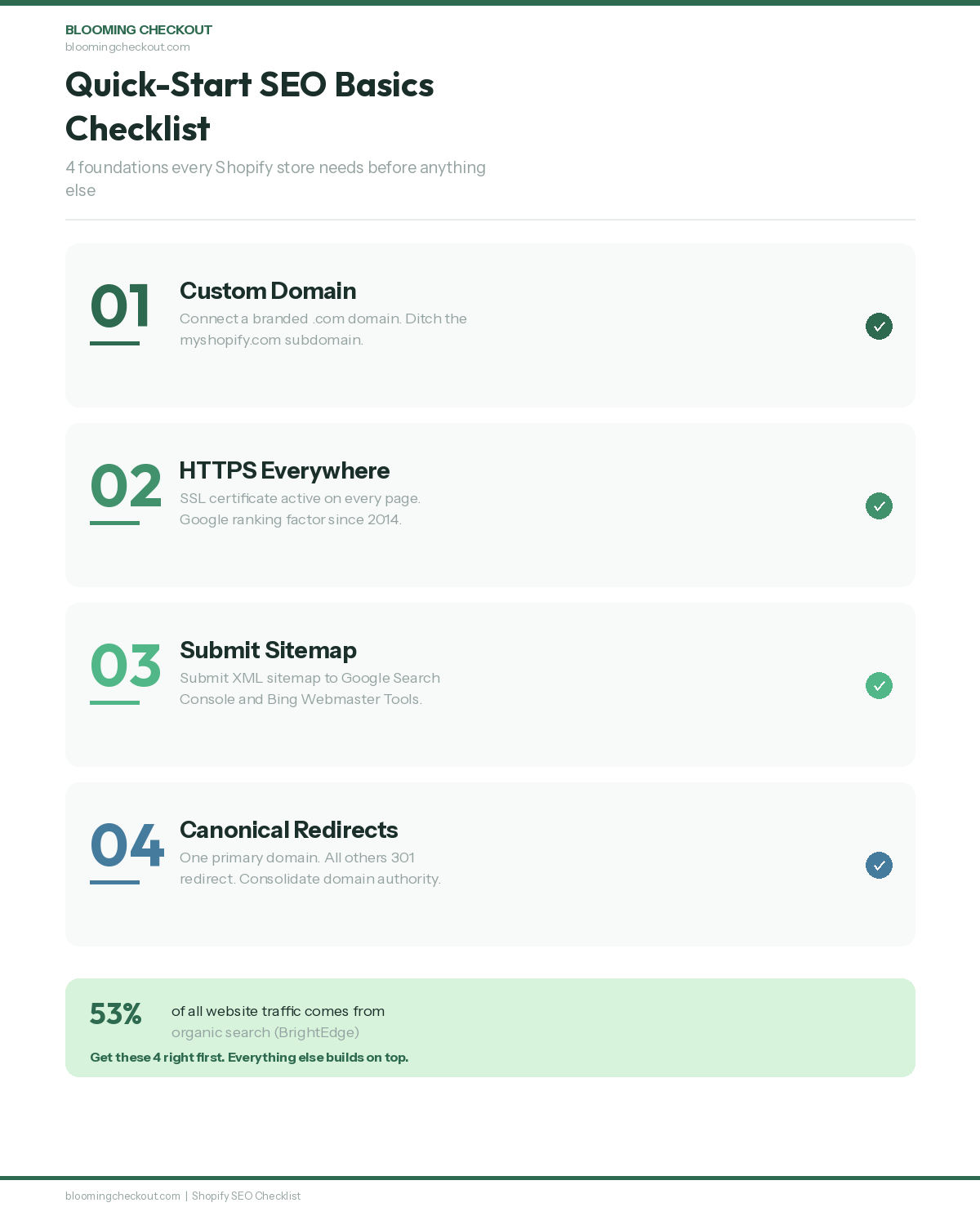
That gap between a good-looking store and one that actually gets found on Google comes down to search engine optimization. According to BrightEdge research, 53% of all website traffic comes from organic search, making SEO the single largest source of web traffic for most online stores. SEO is not a one-time job or a single switch you flip. It is a series of small, specific steps that add up over time to bring organic traffic to your online store.
An essential SEO checklist includes technical foundations such as HTTPS, mobile-friendliness, and fast load speeds. This Shopify SEO checklist serves as your on page seo checklist, following proven SEO best practices to help you optimize every aspect of your site.
This Shopify SEO checklist walks you through every step, from the first technical setup to the ongoing monthly tasks that keep your search engine rankings climbing. Whether you are launching a new store or fixing one that has been live for years, work through these sections in order. Tick them off as you go. Following these best practices leads to better search engine rankings, increasing your store's visibility and potential for organic sales.
Every task on this checklist has been tested on real Shopify stores. This is the same process we use for clients at Blooming Checkout. No theory. Just practical steps that work.
Quick Start: SEO Basics Checklist
Before anything else, get these four foundations right. Following SEO best practices is crucial to ensure your Shopify store is set up for long-term success. Without them, nothing else on this list works properly. These are the basics that every Shopify store needs from day one. An essential SEO checklist includes technical foundations such as HTTPS, mobile-friendliness, and fast load speeds.
Buy and Connect a Custom Domain
Your store URL is the first thing Google sees. A myshopify.com subdomain tells search engines this is a temporary or unfinished project. A clean custom domain like yourbrand.com signals a real business worth indexing.
Register your domain through a reputable registrar and connect it to your Shopify store through the Domains section of your admin panel. If you already own a domain, point the DNS records to Shopify's servers. Your custom domain is the permanent address of your online store and the foundation of all your SEO work.
Turn On HTTPS Site-Wide
Google confirmed that HTTPS is a ranking signal back in 2014, and the weight has only increased since. Google Chrome now labels non-HTTPS sites as "Not Secure" in the browser address bar, which can increase bounce rate and damage trust. Shopify includes a free SSL certificate with every store. Check that every page loads with the padlock icon showing in the browser bar. No exceptions.
HTTPS protects customer data during checkout and signals to both visitors and search engines that your site is trustworthy. If any page loads without HTTPS, it creates a mixed content warning that damages trust and can hurt your rankings.
Submit Your Sitemap to Search Engines
Shopify automatically generates an XML sitemap file at yourdomain.com/sitemap.xml. This file helps search engines understand the structure of your site and find every page you want indexed.
Submit your sitemap through Google Search Console and Bing Webmaster Tools. This tells Google and Bing to crawl your store and add your pages to their index. You can also submit your sitemap to other search engines to increase your website's visibility. Without this step, search engines rely on discovering your pages through links alone, which is slower and less reliable.
Set Canonical Domains and Redirects
If you have more than one domain pointing to your store, choose one as your primary and redirect the others. This stops Google from splitting your ranking power across duplicate versions of the same site.
Shopify lets you add up to 10 domains and subdomains, but only one should be canonical. All other versions, including the www and non-www variants, should redirect to your chosen primary domain using 301 redirects. This consolidation of domain authority and link equity is one of the simplest wins in technical SEO. Without proper canonicalisation, PageRank can be diluted across duplicate URLs, weakening your rankings for every version of the page.
Technical SEO Setup for Search Engines
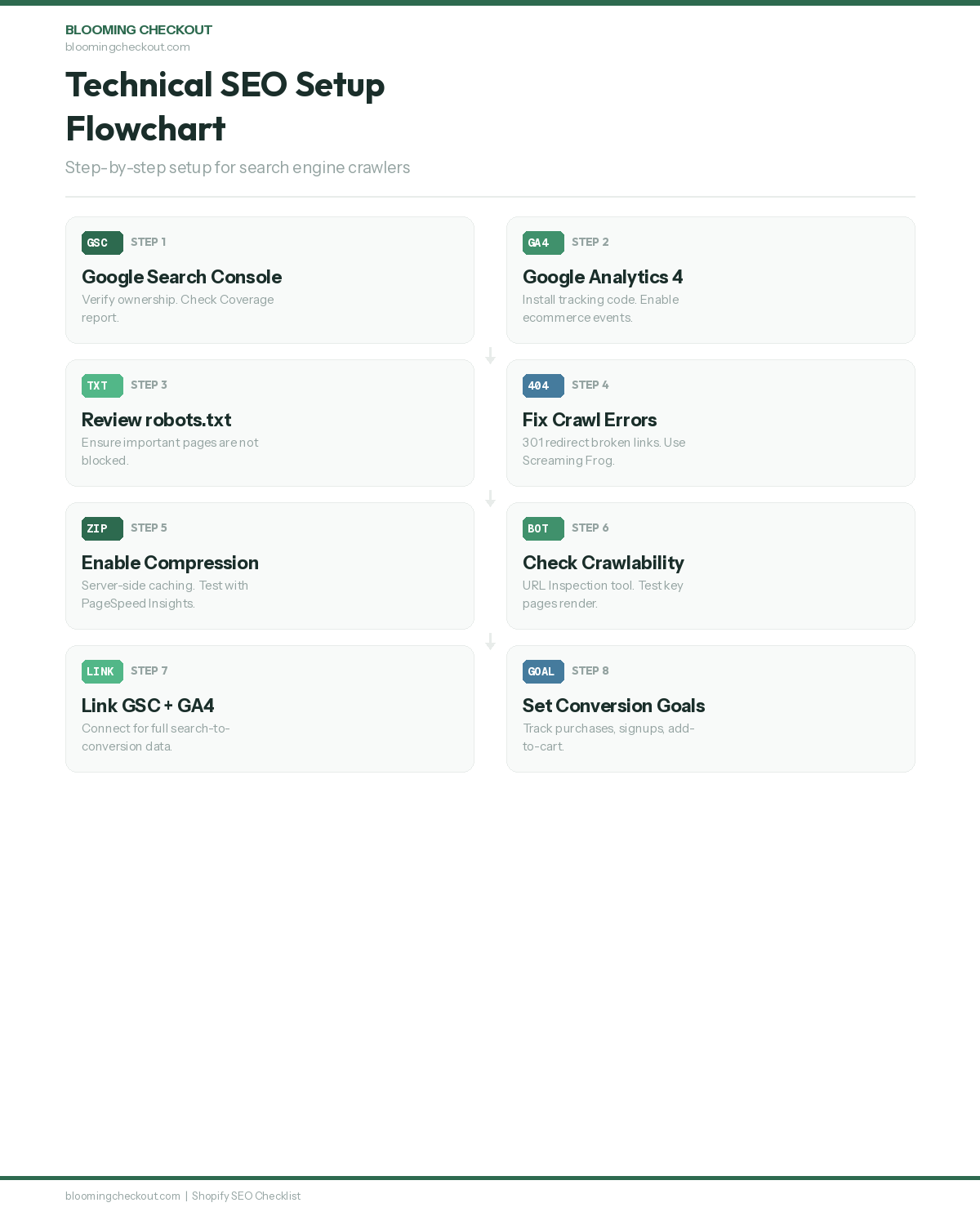
A well-organised Shopify store structure is important for both user experience and for helping search engines crawl your site efficiently. These technical SEO steps make sure search engine crawlers can reach, read, and index your pages properly, and they are especially relevant for Shopify sites.
Configure Google Search Console
Setting up Google Search Console is a first step for monitoring your site in Google search results. Google Search Console is one of the essential SEO tools for any website owner. Add your property, verify ownership using one of the available methods (DNS record, HTML file, or meta tag), and check the Coverage report for any crawl errors.
This free tool from Google shows which pages are indexed, which have errors, and what search terms bring people to your store. It is the single most important free SEO tool available to any website owner. Setting up a Google Analytics account alongside Search Console provides a complete view of your site's performance.
Review Your Robots.txt File
Shopify generates a robots.txt file automatically, but you should review it. Your robots.txt file tells search engine crawlers which parts of your site to index and which to skip. This file directly influences which parts of your site search engines index, so it's crucial to configure it correctly.
Make sure it does not block important pages from search engine bots. By default, Shopify blocks internal search results pages and cart pages, which is correct. But if you have made custom changes or installed apps that modify this file, check that collection pages, product pages, and blog posts are all accessible to crawlers.
Fix Crawl Errors and Broken Links
Broken links hurt your site integrity and frustrate visitors. Check Google Search Console regularly for 404 errors and redirect chains.
Every broken link is a dead end for both visitors and search engine crawlers. Fix them by adding 301 redirects to the correct pages. Running a crawl audit with a tool like Screaming Frog helps you find every broken link, redirect chain, and orphan page across your entire store. Pay special attention to broken links on high-traffic pages, because these have the most impact on both user experience and crawl budget efficiency. A clean site with zero crawl errors tells Google your store is well maintained.
Enable Server-Side Compression and Caching
Shopify handles most server-level performance for you through their global infrastructure. Your store already benefits from Shopify's content delivery network and built-in caching.
Check that images and assets are loading efficiently by running your homepage through Google PageSpeed Insights. Compressed files mean faster page loads, and faster pages rank better. If you see compression warnings, the issue is usually unoptimised images or third-party scripts rather than Shopify's servers.
Check Your Site for Crawlability
Beyond fixing errors, actively check that Google can access all your important pages. Use the URL Inspection tool in Google Search Console to test individual pages. This tool shows you exactly how Google sees your page, including any resources it cannot load.
If Google cannot render your page properly because of blocked JavaScript or CSS files, your content might not be indexed correctly. Test your most important collection pages and product pages to make sure Google can see everything.
Additionally, creating an internal link strategy within your own website further improves crawlability and helps search engines discover all your important pages.
Set Up Google Analytics
Google Analytics is your window into how visitors interact with your website. Without proper analytics tracking, you are guessing at what works and what does not.
Install Google Analytics 4
Add the GA4 tracking code to your Shopify store through the Online Store preferences or via a custom pixel. GA4 replaces the old Universal Analytics and gives you event-based tracking that shows exactly what visitors do on each page.
The GA4 data model tracks events rather than pageviews, which means you get richer data about how people interact with your store. Make sure the tracking code fires on every page, including checkout pages where possible.
Link Google Analytics to Search Console
Once both tools are set up, connect them through the GA4 admin panel. This integration lets you see which search queries drive traffic and how visitors behave after they land on your site.
The combined data shows the full picture, from Google search to checkout. You can see which keywords bring the highest-converting visitors and which landing pages need work. This connection between search data and behaviour data is where real SEO insights come from.
Turn On Ecommerce Tracking Events
Shopify and GA4 work together to track add-to-cart events, checkout starts, and completed purchases. Make sure these ecommerce events fire correctly by testing them with the GA4 DebugView.
Without ecommerce tracking, you cannot measure which SEO work actually drives revenue. The goal of SEO is not just traffic. It is revenue. And you need proper tracking to connect the two.
Create Conversion Goals and Funnels
Set up goals for the actions that matter most to your business. Track purchases, email signups, add-to-cart clicks, and any other conversion events that indicate buyer intent.
Build funnels to see where visitors drop off between landing on your site and completing a purchase. This data tells you which pages need attention and where your SEO traffic is leaking out of the conversion path.
Keyword Research and Search Intent
Keyword research is the foundation of every SEO strategy. Every page on your Shopify store should target a specific set of search terms that real people type into Google. The goal of keyword research is to identify valuable keywords that attract your target audience and drive qualified traffic. Without proper keyword research, every other step on this checklist is a guess.
Identify Buyer-Intent Keywords
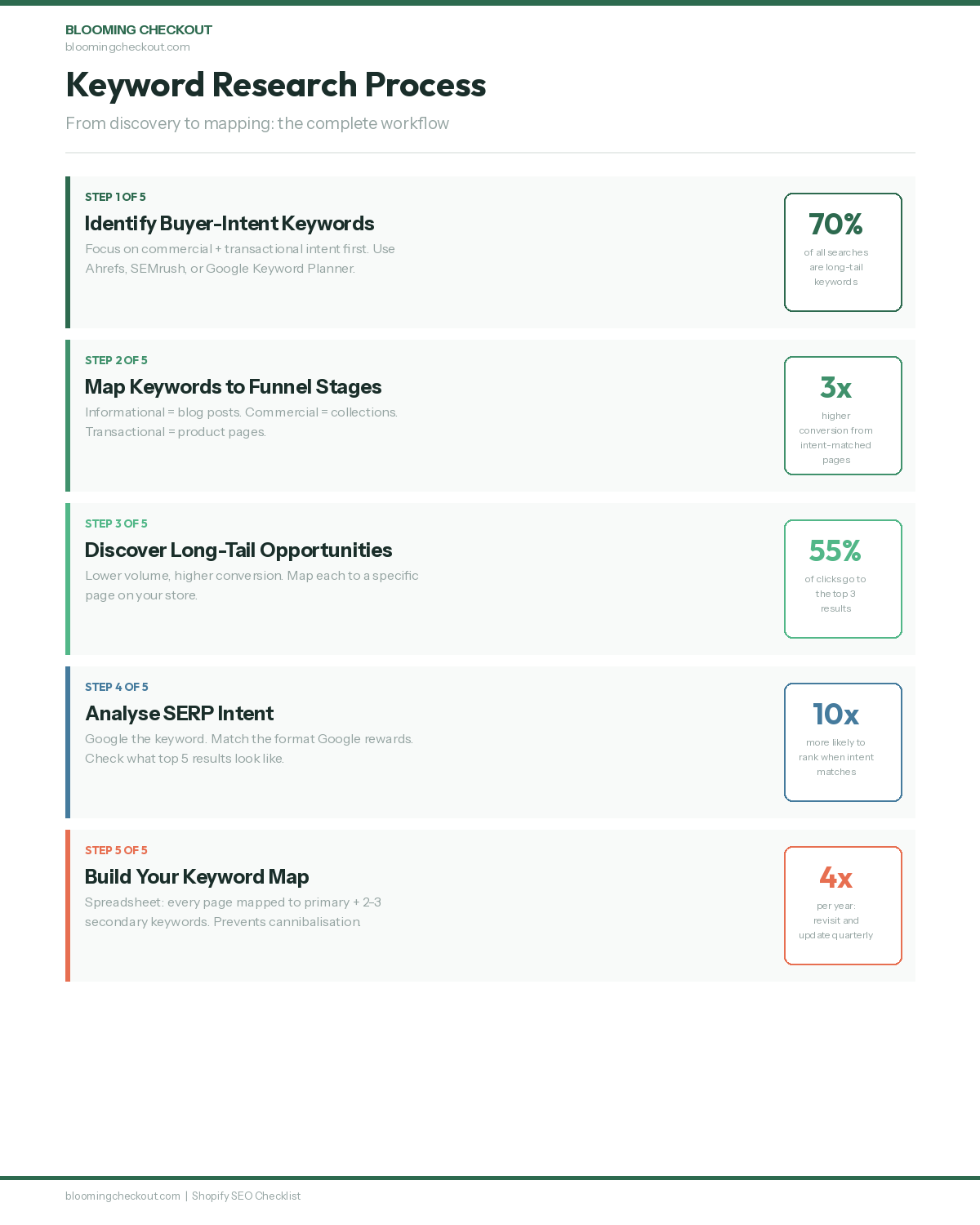
Not all keywords are equal. Someone searching "blue running shoes buy online" is much closer to purchasing than someone searching "best running shoes 2025." Focus on search terms where the person is ready to act.
Using keyword research tools like Ahrefs, SEMrush, or Google Keyword Planner helps discover high-volume and long-tail keywords relevant to your products. Sort by commercial and transactional intent first. These are the keywords that drive revenue, not just traffic. Long-tail keywords make up approximately 70% of all search queries and typically convert at higher rates because they signal specific buyer intent.
Map Keywords to Funnel Stages
Group your keywords by search intent: informational (learning), commercial (comparing), and transactional (buying).
Blog posts serve informational queries. Collection pages serve commercial ones. Product pages serve transactional ones. Understanding search intent is the difference between ranking on the right page and wasting effort on the wrong one. Every page on your site should match the intent behind its target keyword.
Discover Long-Tail Keywords
Long-tail keywords usually have lower search volume but attract more qualified traffic. A term like "organic cotton baby blankets Cape Town" will convert better than "baby blankets" even though fewer people search for it.
Map each long-tail keyword to a specific page so every page on your site can rank for different terms. Long-tail keywords also tend to have lower competition, which means faster results for newer stores that cannot yet compete for broad head terms.
Confirm Search Intent via SERP Analysis
Before you write anything, Google the keyword and look at the top results. If Google shows product pages, your collection page should rank. If Google shows blog posts, write a blog post.
The search engine results page (SERP) tells you what format Google wants. Matching that intent is half the battle. The top 3 Google results receive approximately 55% of all clicks, so understanding what Google rewards for a given query is essential. If the top ten results are all long-form guides and you publish a 200-word product listing, you will not rank regardless of how good your keyword targeting is.
Build a Keyword Map for Your Store
Create a spreadsheet that maps every important page on your site to its primary keyword and two to three secondary keywords. This keyword map prevents cannibalisation, where two of your own pages compete against each other for the same search term.
Keyword research should be an ongoing process. Trends change, seasons shift, and new competitors appear. Revisit your keyword list at least quarterly and update your keyword map as you add new products and collections.
On-Page SEO: Title Tags, Meta Descriptions, and Content
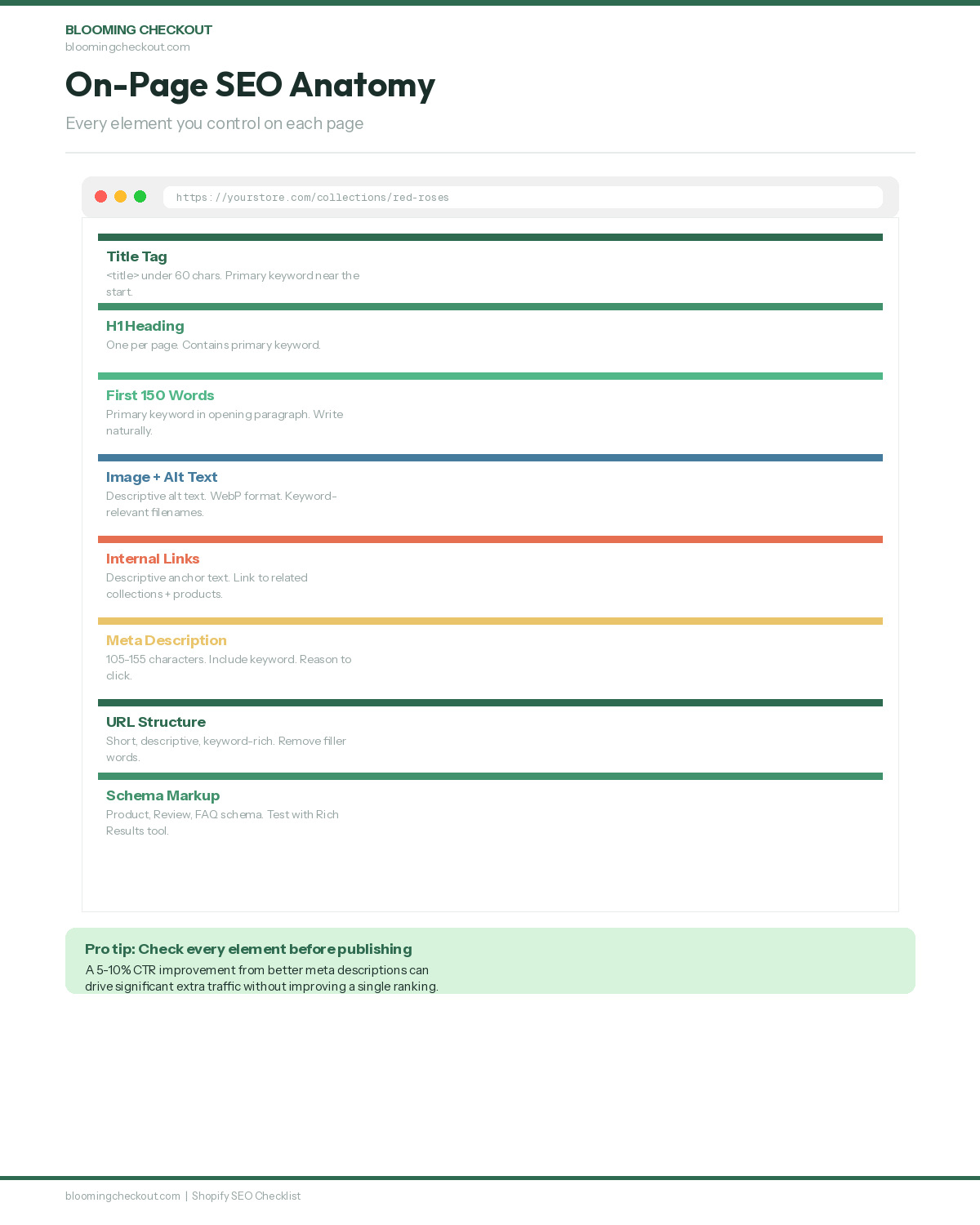
On-page SEO is where most of your daily work happens. Page optimization is a key part of on-page SEO, focusing on improving search engine rankings and increasing organic traffic. These are the elements you control directly on each page, and they tell search engines exactly what your content is about. Optimizing title tags is crucial as they help search engines understand the content of your pages and improve click-through rates. It's also important to write compelling meta descriptions to attract users' attention and encourage more clicks from search results.
Write a Title Tag With Your Primary Keyword
Title tags should be under 60 characters and contain the primary keyword near the beginning. The title tag is the blue clickable link in Google search results, so it needs to earn the click while telling Google what the page is about.
Every page on your store needs a unique title tag. Duplicate title tags across multiple pages confuse search engines and dilute your ranking power. Shopify lets you edit title tags for every page, product, collection, and blog post through the SEO section of each editor.
Write Unique Meta Descriptions for Every Page
Meta descriptions should aim for 105 to 155 characters and clearly describe the page content. Writing compelling meta descriptions is one of the most direct ways to improve your click-through rate from search results.
A good meta description includes your target keyword naturally and ends with a reason to click through. Studies show that well-written meta descriptions can improve click-through rate by 5–10% compared to auto-generated snippets. Think of it as a tiny advertisement for your page. Google does not always use your meta description, but when it does, a well-written one can significantly increase clicks.
Use One H1 Per Page With Your Primary Keyword
A single H1 tag should be used for the main headline of each page. Use H2 and H3 tags for organising subtopics logically beneath it.
Search engines use heading structure to understand your page hierarchy. A clear heading structure also helps visitors scan your content quickly. Most Shopify themes automatically use the page title as the H1, but check your theme code to make sure there is only one H1 per page.
Place Your Primary Keyword in the First 150 Words
Google weighs content near the top of the page more heavily. Get your main keyword in early, naturally, within the opening paragraph.
This does not mean stuffing your keyword awkwardly into the first sentence. Write a natural opening that addresses the reader's question or need, and let your primary keyword appear as part of that natural introduction. If the keyword does not fit in the first paragraph, your opening probably needs rewriting.
Write Descriptive Alt Text for Every Image
Using descriptive alt text for images helps search engines understand the content of your images and improves accessibility for visitors using screen readers. Alt text also helps your images appear in Google Image search results.
Do not stuff keywords into alt text. Describe what the image actually shows in plain language. "Red roses in a glass vase with baby's breath" is far more useful than "buy roses online best flower delivery." Google can tell the difference.
Optimise Your URL Structure
Keep your URLs short, descriptive, and keyword-rich. Shopify generates URLs automatically based on your page titles, but you can edit them before publishing.
Remove unnecessary words like "the," "and," and "of" from your URLs. A clean URL like /collections/red-roses is better than /collections/our-beautiful-collection-of-red-roses-for-sale. Short URLs are easier for both search engines and humans to understand.
Product Page SEO
Your product pages are where conversions happen. They need to work for both search engines and real shoppers who are ready to buy. To get the best results, it is essential to optimize product and collection pages, as these are core components of an ecommerce SEO strategy. Properly optimized product and collection pages play a key role in enhancing user experience, strengthening internal linking, and building site credibility. Optimizing product pages is crucial for driving conversions and improving SEO, requiring detailed, keyword-rich descriptions and high-quality images. Make sure to optimize product pages by enhancing titles, descriptions, images, schema markup, and reviews to boost both visibility and conversion rates.
Write Unique Product Descriptions
Every product needs its own description. Do not copy the manufacturer's text and do not duplicate descriptions across similar products. Duplicate content confuses search engines and makes your pages compete against each other instead of ranking independently.
Write descriptions that answer the questions your customers actually ask. Include materials, dimensions, care instructions, and styling suggestions. The more specific and useful your product descriptions are, the better they perform for both SEO and conversions.
Add Product Schema Markup
Using structured data on Shopify helps search engines understand your content better and can lead to rich snippets in search results. Product schema tells Google the price, availability, review rating, and condition before anyone clicks through.
Rich results with pricing and star ratings earn significantly higher click-through rates than plain text listings. Implementing structured data and schema markup can increase CTR by up to 30%. Most modern Shopify themes include basic product schema, but check that it outputs all the fields Google supports.
Encourage and Display Customer Reviews
Reviews add fresh, unique content to your product pages and build trust with both shoppers and search engines. Set up automated post-purchase emails asking for reviews after delivery.
More reviews mean more user-generated content that helps your pages rank for natural language queries. A customer writing "these flowers lasted two weeks in the vase" creates content you could never write yourself. Review content also feeds into your review schema for rich results in search.
Use High-Quality Product Images and Videos
Rich media keeps visitors on the page longer, improving dwell time, which signals to Google that your content is worth showing. Adding video to product pages can increase purchase conversions by up to 80%. Upload multiple product images from different angles and include video where possible.
Compress all images to WebP format for fast loading without losing quality. Name your image files descriptively before uploading. A file named "red-roses-bouquet-dozen.webp" carries more SEO value than "IMG_4582.jpg." Every image should have descriptive alt text.
Optimise Product Titles for Search
Your product titles should include the primary keyword for that product while remaining clear and descriptive for shoppers. A title like "Dozen Red Roses - Fresh Hand-Tied Bouquet" works for both search engines and customers.
Avoid vague product names that only make sense within your brand. If your product is called "The Romeo," add descriptive text so Google knows it is a red rose bouquet. Customers searching on Google do not know your product names. They search by description.
Site Structure and Internal Linking
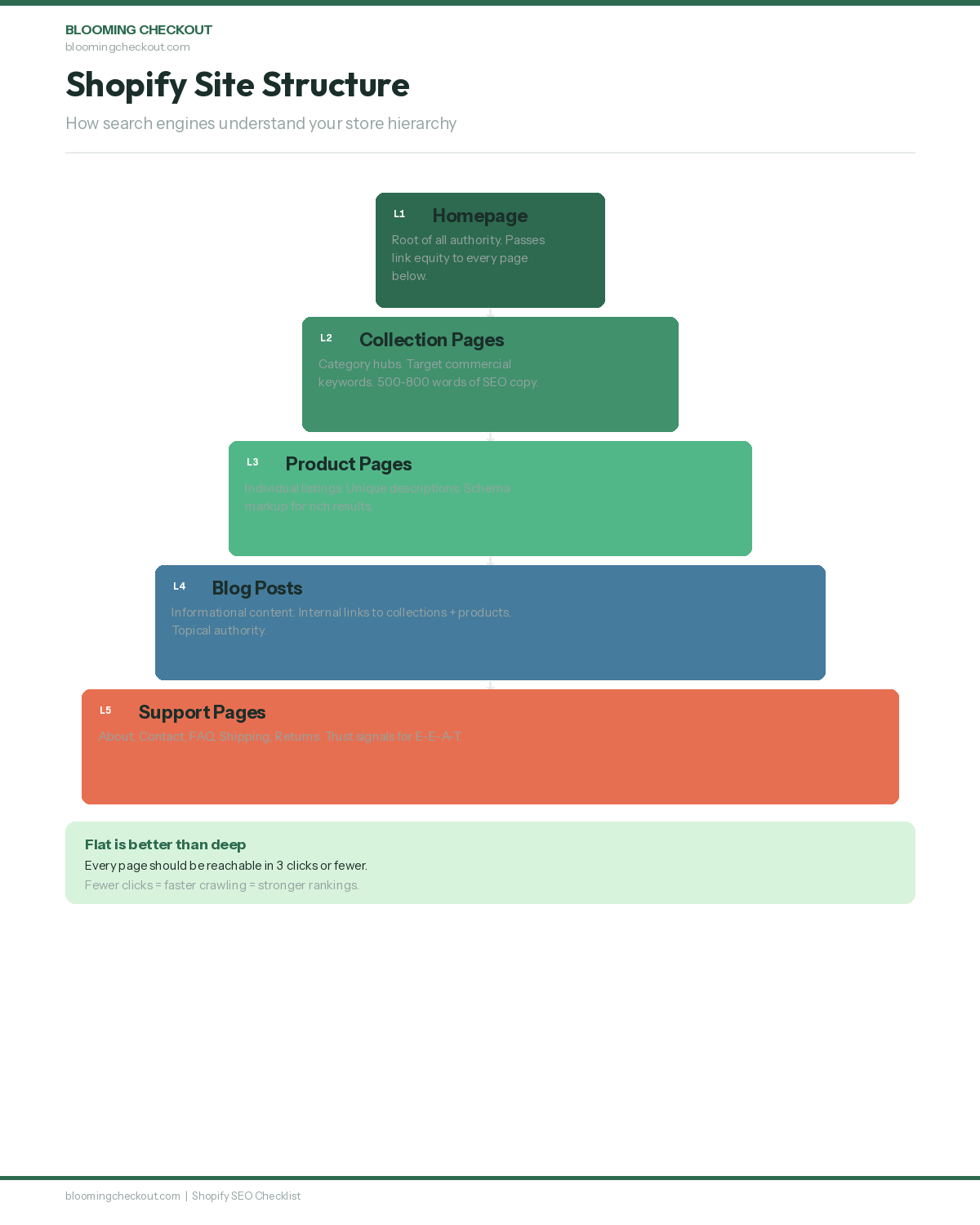
A clear site structure helps search engines crawl your site more thoroughly and helps visitors find what they need. Internal linking is one of the most underused SEO tactics for Shopify stores.
Limit Click Depth to Three Clicks
Every important page should be reachable within three clicks from your homepage. Deep-buried pages get crawled less often and rank more slowly.
Keep your navigation clean and logical. Your main menu should link to your primary collections. Each collection links to its products. This flat structure ensures search engine crawlers can reach every page quickly and that your most important pages get the most internal link equity.
Use Breadcrumb Navigation Site-Wide
Breadcrumbs show visitors where they are in your store hierarchy and give search engines another way to understand your site structure. A typical breadcrumb path looks like: Home > Collections > Red Roses > Dozen Red Roses.
Most modern Shopify themes include breadcrumb support. If yours does not, add it. Breadcrumbs improve both user experience and crawlability, and Google often displays breadcrumb paths in search results instead of raw URLs.
Link Collections to Relevant Products and Content
Internal linking helps search engines recognise your site structure and improves the user experience by guiding visitors to related content. Every collection page should link to its products, and every product should link back to its parent collection.
Go beyond the automatic links. Add contextual internal links within your collection page descriptions, blog posts, and product descriptions that point to related pages. Each internal link passes ranking power to the linked page and helps Google understand the topical relationships between your content.
Use Descriptive Anchor Text
When you add internal links, use natural keyword phrases as the clickable text. "Shop our rose arrangements" is far more useful to search engines than "click here."
Descriptive anchor text tells both visitors and search engine crawlers what they will find on the linked page. Vary your anchor text naturally across different linking pages. Using the exact same anchor text everywhere looks unnatural to Google.
Create a Logical Collection Hierarchy
Organise your collections in a way that makes sense to both shoppers and search engines. Use broad parent collections with more specific sub-collections beneath them.
For example, a flower store might have "Birthday Flowers" as a parent collection, with "Birthday Roses," "Birthday Lilies," and "Birthday Mixed Bouquets" as sub-collections. This hierarchy helps Google understand the topical depth of your store and gives you more pages to target more specific keywords.
Performance, Page Speed, and Core Web Vitals
Page speed is a confirmed Google ranking factor. Having a mobile friendly site is essential for both user experience and search rankings, as Google uses mobile-first indexing and users expect easy navigation and fast loading on mobile devices. Shopify stores are generally fast-loading thanks to Shopify's infrastructure, which is beneficial for SEO since site speed is a ranking factor. Optimizing for Core Web Vitals is crucial for improving site speed and user experience, both of which are important ranking factors. There are still plenty of things that can slow down a Shopify store. A slow site loses both rankings and customers.
Compress and Serve WebP Images
Large images are the number one cause of slow Shopify stores. Pages that load in under 2.5 seconds see nearly double the conversion rate of slower pages. Convert all product and banner images to WebP format and use Shopify's built-in image resizing to serve appropriately sized images for each device.
Every kilobyte saved is a fraction of a second faster for your visitors. A product image does not need to be 4000 pixels wide. Serve the right size for the context. Hero banners need to be large. Thumbnail grids do not.
Reduce Installed Shopify Apps
Every app adds JavaScript to your store. Many add scripts to every single page, even pages where the app is never used.
Audit your installed apps quarterly. If you are not actively using an app, remove it. Some apps leave behind residual code even after uninstallation, so check your theme code for leftover scripts. Your site speed and your Core Web Vitals scores will thank you.
Use a CDN for Static Assets
Shopify serves your store through their global CDN by default. This means your store loads quickly for visitors regardless of their physical location.
Check that third-party scripts and custom fonts are also loading efficiently. Tools like Google PageSpeed Insights show exactly what is slowing your pages down and which resources take the longest to load. Address the biggest bottlenecks first for the most noticeable improvements.
Monitor Core Web Vitals Monthly
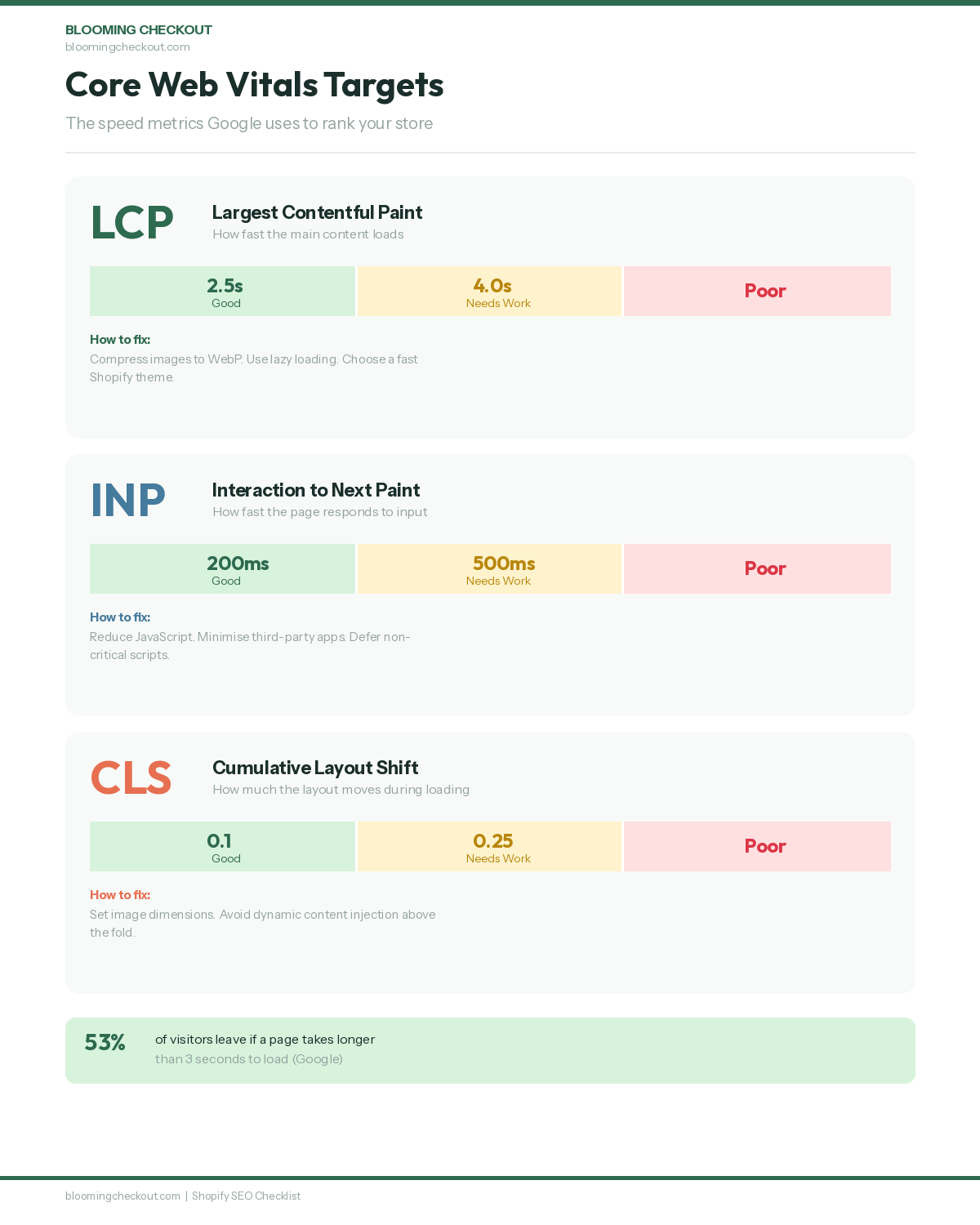
Three Core Web Vitals metrics matter for your Google rankings:
Largest Contentful Paint (LCP) should be under 2.5 seconds. This measures how fast the main content of your page becomes visible to the visitor.
Interaction to Next Paint (INP) should be under 200 milliseconds. This measures how quickly your site responds when visitors click or tap on interactive elements.
Cumulative Layout Shift (CLS) should be under 0.1. This measures whether page elements jump around as the page loads, which frustrates visitors and signals poor page quality to Google.
Check these monthly in Google Search Console under the Core Web Vitals report. Google uses these metrics as ranking factors, and stores that pass all three thresholds earn a ranking boost.
Minimise Render-Blocking Resources
JavaScript and CSS files that block the initial page render slow down your Largest Contentful Paint score. Defer non-critical scripts and inline critical CSS to speed up the first meaningful paint.
Most Shopify themes load all scripts in the head of the document, which blocks rendering until they finish loading. Moving non-essential scripts to the footer or adding async and defer attributes can improve load times significantly.
Schema Markup for Rich Results
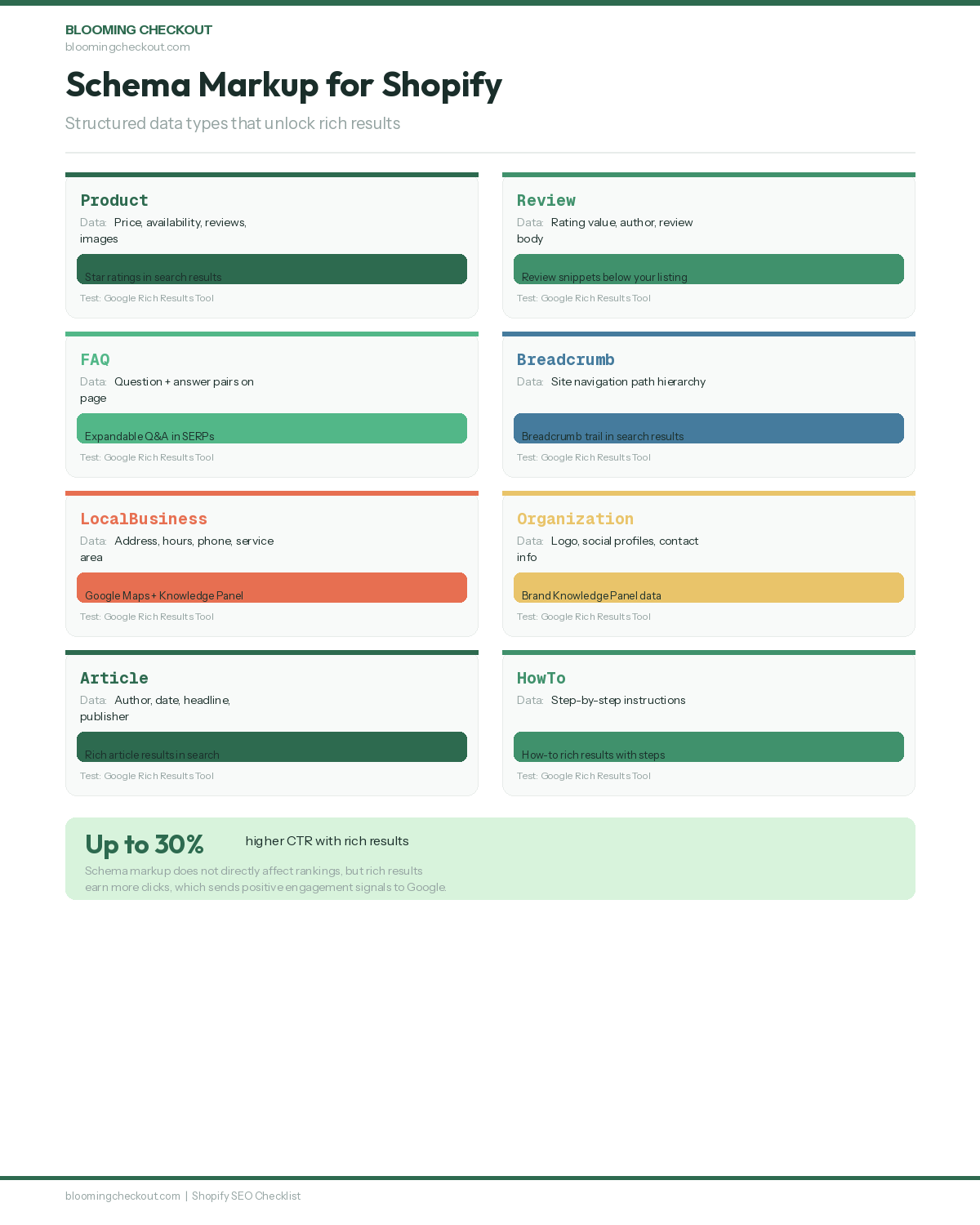
Schema markup helps search engines understand your website content better and can lead to rich snippets in search results. Those rich snippets, the ones with star ratings, prices, and FAQ dropdowns, earn significantly higher click-through rates than plain text results.
Add Product Schema
Product schema tells Google the name, description, price, availability, and condition of your products. This information can appear directly in search results, giving your listing more visual weight than competitors without schema.
Make sure your product schema includes all available fields: name, description, image, price, currency, availability, brand, and SKU. The more complete your product schema, the more likely Google is to display rich results for your products.
Add Review and Rating Schema
Review schema displays star ratings in search results. For ecommerce stores, this is one of the highest-impact schema types you can add.
A listing with five gold stars stands out immediately against competitors showing plain text. Aggregate rating schema shows the average rating and total number of reviews, which builds trust before anyone even visits your store.
Add FAQ Schema
If your page has a frequently asked questions section, mark it up with FAQ schema. This can display your questions and answers directly in Google search results, taking up more real estate on the results page and pushing competitors down.
Implementing structured data such as FAQ, Product, or Article schema also helps AI systems extract answers from your content and display them in rich results and AI Overviews. FAQ schema is one of the easiest schema types to add and one of the most visible in search results.
Add Organisation and Local Business Schema
Organisation schema tells Google about your business entity: name, logo, social media profiles, and contact information. If you have a physical location, Local Business schema adds your address, opening hours, and geographic coordinates.
This schema feeds into Google's Knowledge Graph and can trigger a branded knowledge panel when someone searches for your business name. It also supports your local SEO efforts by confirming your business details to Google. If you sell products through Google Shopping, connecting your Google Merchant Center feed ensures your product data and schema stay consistent across all Google surfaces.
Test Schema With the Rich Results Tool
After adding any schema, test it at Google's Rich Results Test. Fix any errors or warnings before moving on.
Broken schema is worse than no schema because it tells Google you tried and got it wrong. Test regularly, especially after theme updates or app installations that might modify your structured data. Validating your schema should be part of every page launch checklist.
Shopify-Specific SEO Checks
Shopify is designed with SEO in mind, offering built-in features that support your ranking efforts. But the default settings are not always enough. These Shopify-specific checks catch the platform quirks that most store owners miss.
Choose a Responsive, Fast Shopify Theme
Your theme is the foundation of your store's speed and mobile experience. A mobile-first design must ensure the site is fully responsive and provides a zoom-free experience for users on mobile devices.
Google uses mobile-first indexing, which means Google's crawler evaluates your mobile site, not your desktop site, when deciding rankings. With mobile devices accounting for over 60% of all Google searches worldwide, a poor mobile experience directly limits your organic traffic potential. Choose a Shopify theme that scores well in PageSpeed Insights on mobile and that displays your content clearly on all screen sizes.
Install an SEO App for Metadata Automation
Shopify provides various SEO apps and tools that can simplify efforts for store owners. Apps like Smart SEO or SEO Manager can auto-generate meta tags for products and collections, fix broken links, manage redirects at scale, and create structured data automatically.
An SEO app is not a replacement for the strategic work in this checklist. Think of it as a tool that handles the repetitive mechanical tasks so you can focus on the strategic decisions that actually move rankings.
Configure Canonical Tags Site-Wide
Shopify automatically adds canonical tags to pages to prevent duplicate content issues. But you should check them, especially on product pages.
Products that appear in multiple collections can create duplicate URLs with different collection paths. Make sure the canonical tag points to the primary version of each page. The canonical URL should always be the cleanest version without collection path prefixes.
Remove Unnecessary Theme Scripts
Many Shopify themes come loaded with features you do not use: sliders, animations, countdown timers, social media widgets. Each unused feature adds code weight that slows your store and hurts your Core Web Vitals.
Work with your theme settings or a developer to remove what you do not need. A leaner theme loads faster, scores better in speed tests, and provides a better experience for your visitors. Every millisecond counts.
Optimise Your Shopify Navigation for SEO
Your main navigation menu is one of the strongest internal linking signals on your site. Every page linked from your main menu receives more internal link equity than pages buried deep in your site structure.
Include your most important collection pages in your main navigation. Use descriptive menu labels that include relevant keywords naturally. A menu item labelled "Birthday Flowers" is better for SEO than one labelled "Shop" or "Products."
Local SEO for Physical Stores
If you have a physical location or serve a specific geographic area, local SEO brings nearby customers to your door. Local search results appear with maps, reviews, and business information that drive foot traffic and phone calls.
Claim Your Google Business Profile
Setting up a Google Business Profile helps local businesses improve visibility in local search results and Google Maps. Add your business name, address, phone number, hours, and photos.
This free listing is often the first thing people see when they search for businesses near them. Keep your profile updated with current hours, seasonal changes, and fresh photos. Post regular updates to show Google your business is active and engaged with customers.
Add NAP Details Consistently
Your Name, Address, and Phone number should appear consistently on every page of your site, usually in the footer. This is called NAP consistency.
Consistency across your website, Google Business Profile, and all other online directories tells Google your business information is trustworthy. Even small differences, like "St" versus "Street" or a missing suite number, can confuse search engines and weaken your local signals.
Create Dedicated Location Pages
If you serve multiple areas, build a unique page for each one. Creating city-specific landing pages helps businesses rank for individual market areas without needing separate websites for each location. If you sell internationally, consider adding hreflang tags to signal which language and regional version of a page should appear for users in different countries.
Each location page should include specific local details: delivery areas, directions, local landmarks, and area-specific product availability. Generic pages with just the city name swapped out do not work. Google needs to see unique, locally relevant content on each page.
Collect and Display Customer Reviews
Encouraging satisfied customers to leave positive reviews improves local search visibility significantly. Google weighs review quantity, quality, and recency heavily in local rankings.
Make it easy for happy customers to leave a review by sending a direct link after purchase. Respond to all reviews, positive and negative, to show Google and potential customers that you are engaged and responsive.
Build Local Citations and Directory Listings
List your business on relevant local directories, industry-specific directories, and data aggregators. Each consistent citation strengthens your local SEO signals.
Focus on quality directories relevant to your industry rather than mass-submitting to hundreds of low-quality directories. For South African businesses, this includes directories like HelloPeter, Yellow Pages, and industry-specific listings.
Link Building and Off-Page Authority
Everything above happens on your own site. But Google also looks at what other websites say about you. High quality backlinks from reputable websites act as votes of confidence for your store and are a major ranking factor.
Earn Links Through Guest Blogging
Writing a guest post for a blog in your niche puts your brand in front of a new audience and earns a backlink to your store. Pitch practical, helpful content that the host site's readers will genuinely benefit from.
One strong guest post on a well-respected site is worth more than dozens of links from low-quality directories. The average first-page Google result has 3.8x more backlinks than results on page two, which shows how much link authority matters. Focus on sites with real audiences, editorial standards, and domain authority in your niche.
Create Content Worth Linking To
Original guides, how-to content, data studies, and useful tools attract backlinks naturally without you having to ask. Think about what you can publish that someone else would want to reference in their own writing.
Data, original research, industry surveys, and free resources work particularly well as link magnets. The best linkable content answers a question that many people ask but few have answered well.
Monitor Competitor Backlink Profiles
Checking where your competitors earn their backlinks can reveal opportunities you have not considered. If a competitor is listed on a local business directory, mentioned in an industry article, or featured in a gift guide, there is a good chance you can earn a similar mention.
Tools like Ahrefs and Moz show you exactly where competitor backlinks come from. This competitive analysis turns your competitors' link building success into your own roadmap.
Reclaim Unlinked Brand Mentions
If someone writes about your brand but does not link to your site, reach out and ask for the link. Most people are happy to add it once you point it out.
Tools like Ahrefs Content Explorer and Google Alerts help you find these unlinked mentions. This is one of the easiest link building tactics because the hardest part, getting someone to write about you, has already happened.
Seek Press Coverage and Product Features
Local press coverage, product features, gift guide inclusions, and industry roundups all build strong backlinks. Send products to local journalists and bloggers. Pitch seasonal angles tied to holidays and events.
A single press mention from a respected publication carries weight that hundreds of low-quality links cannot match. Building quality backlinks takes time, but each one compounds. A steady, honest approach works better than any shortcut.
Monitoring, Reporting, and Ongoing SEO Tasks
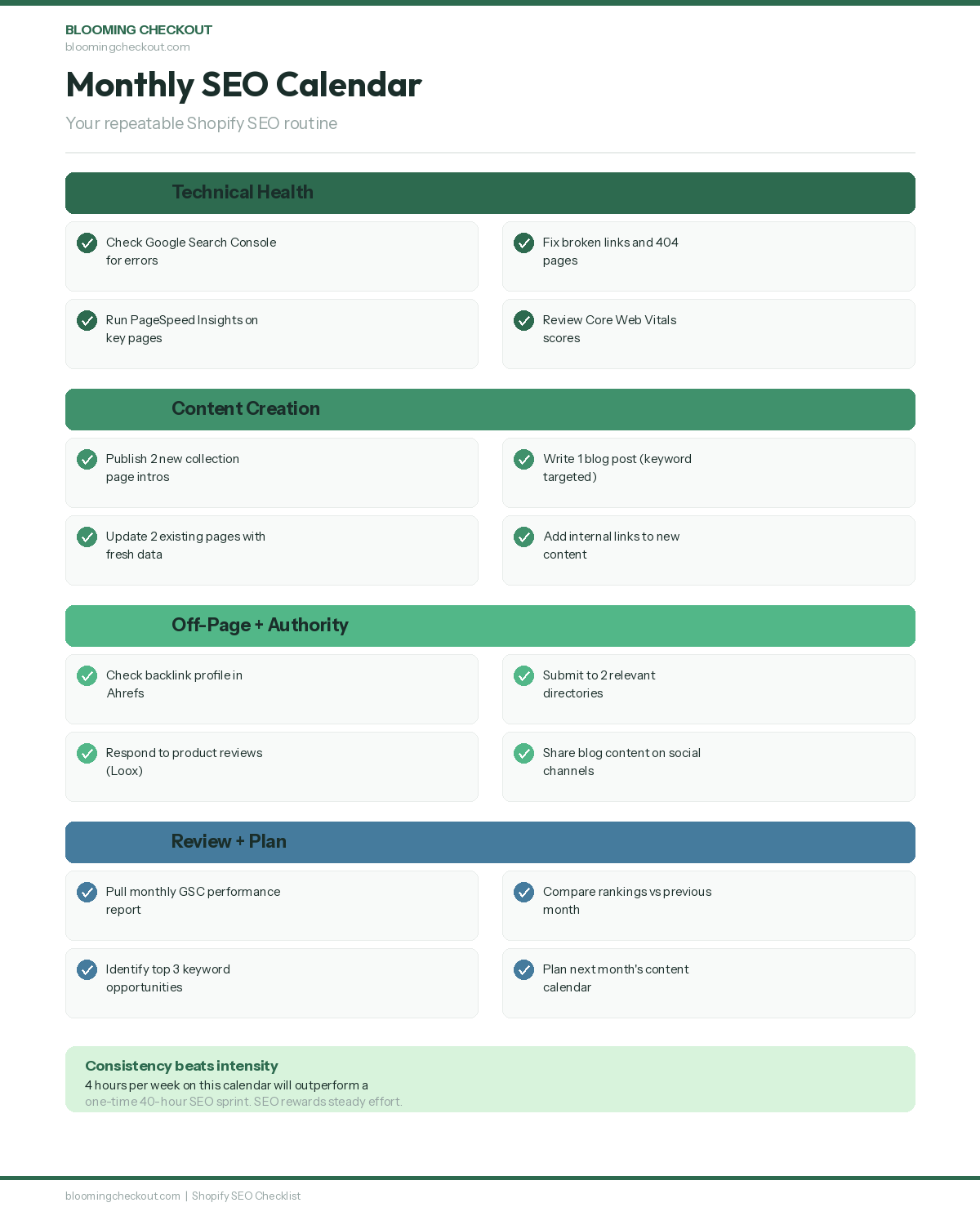
SEO is not a once-off project. Regularly monitoring and analysing SEO performance is what separates stores that rank from stores that used to rank. These ongoing tasks keep your store's SEO healthy over time.
Set Up Rank Tracking for Target Keywords
Pick your 20 to 30 most important keywords and track them weekly. Tools like Ahrefs, SEMrush, or even a simple spreadsheet help you spot ranking trends before they become problems.
Watch for both improvements and drops. A sudden ranking drop could signal a technical issue, a Google algorithm update (Google makes thousands of algorithm changes per year), or new competition. Catching drops early means you can respond before the traffic impact compounds.
Create Monthly Analytics Reports
Google Analytics is your window into traffic sources, user behaviour, and conversion patterns. Build a simple monthly report that tracks sessions, revenue, top landing pages, organic traffic percentage, and traffic channels.
Compare month over month and year over year to spot what is working. Monthly reporting creates accountability and helps you measure the return on your SEO investment over time.
Review Search Console Coverage Weekly
New crawl errors appear regularly, especially if you add or remove products often. Check the Coverage and Performance reports in Google Search Console weekly.
A five-minute weekly check prevents issues from compounding. Look for pages dropping out of the index, new 404 errors, and any mobile usability warnings. Fixing issues quickly keeps your store healthy in Google's eyes.
Schedule Quarterly Technical Audits
Every three months, run a full technical SEO audit. Check for broken links, slow pages, missing meta descriptions, orphaned content, and redirect chains.
Regularly audit and refresh old posts with new data, updated statistics, and fresh examples. Content freshness is a signal Google uses for time-sensitive topics, and Google's E-E-A-T guidelines (Experience, Expertise, Authoritativeness, Trustworthiness) reward content that demonstrates genuine first-hand knowledge and stays current. A quarterly audit catches issues that daily monitoring might miss, and keeps your store's technical foundation solid.
Track and Report on Organic Revenue
The ultimate metric for ecommerce SEO is revenue from organic traffic. Track this monthly using Google Analytics ecommerce data filtered by organic search traffic.
This number tells you the real business impact of your SEO work, beyond rankings and traffic. If organic revenue is growing, your SEO strategy is working. If traffic is growing but revenue is not, you have a conversion problem to solve.
Conversion and Advanced SEO
Once the foundations are solid, these advanced steps push your store from ranking to earning real revenue. This section covers the tactics that separate good stores from great ones.
A/B Test Title Tags for CTR Improvements
Small changes to your title tag can shift click-through rates significantly. Test different title tag versions and measure which ones bring more clicks from the same ranking position.
Even a 1% improvement in CTR across your top pages can drive meaningful additional traffic without improving a single ranking position. Google may use user engagement signals like click-through rate and dwell time as indirect ranking factors, so better CTR can create a positive feedback loop for your rankings. Test emotional triggers, numbers, brackets, and different keyword placements to find what resonates with your audience.
Optimise Your Checkout for Conversions
A visitor who reaches checkout and leaves is the most expensive kind of lost sale. Simplify form fields, add trust badges, offer multiple payment methods like Shop Pay and Apple Pay, and show clear shipping costs early.
Checkout improvements do not directly affect rankings, but they multiply the value of every visitor your SEO brings in. A 1% improvement in checkout conversion rate has the same revenue impact as a significant traffic increase.
Keep Inventory Schema Synced With Product Pages
If a product goes out of stock, your schema should reflect that immediately. Outdated schema showing "in stock" when the item is not available damages trust and can get your rich results removed by Google.
Set up automated processes to keep your structured data in sync with your actual inventory. Many Shopify SEO apps handle this automatically, but verify that the syncing works correctly after any theme or app updates.
Audit High-Value Pages for Content Gaps
Direct, concise answers to common questions placed early in your text increase your chances of being cited by Google's AI Overviews. Look at your top 10 pages by traffic and ask: is there anything missing that competitors cover?
Fill those gaps with specific, useful content. A page that answers every question a visitor might have performs better than one that answers only some. Comprehensive content earns longer time on page and more backlinks.
Optimise for Voice Search and AI Answers
As AI search tools and voice assistants become more common, structuring your content to answer specific questions clearly becomes increasingly important.
Use conversational language in your FAQs. With voice search growing through Google Assistant, Siri, and Alexa, question-based content captures spoken queries that traditional keyword targeting misses. Provide direct, factual answers in the first sentence of each response. Structure your content with clear headings that match the questions people actually ask. Content that is easy for AI systems to parse and cite will perform well as search evolves.
Frequently Asked Questions
How long does SEO take to work on Shopify?
Most Shopify stores start seeing measurable changes in search rankings within 3 to 6 months of consistent work. Technical fixes like broken links and missing meta descriptions can show results within weeks. Content and link building take longer because they require Google to recrawl and re-evaluate your pages. The stores that succeed treat SEO as ongoing work, not a one-time project.
Do I need a Shopify SEO app?
An SEO app helps with repetitive tasks like auto-generating meta descriptions, managing bulk redirects, and creating structured data. It is not a replacement for the strategic work in this checklist, but it saves time on the mechanical parts. Smart SEO and SEO Manager are both solid options for Shopify stores of any size.
What is the most important step on this checklist?
Keyword research. Without it, every other step on this list is a guess. You need to know what your customers actually search for, which pages should target which terms, and what format Google rewards for those queries. Start there and build everything else on top of it.
Does Shopify handle SEO automatically?
Shopify gives you a strong starting point. It generates XML sitemaps, adds canonical tags, includes SSL certificates, and provides basic structured data automatically. But the strategic work, writing unique content, building internal links, choosing the right keywords, earning backlinks, and monitoring performance, is on you. The platform handles the plumbing. You handle the strategy.
How often should I update my SEO?
Weekly check-ins on Search Console and monthly reviews of your Analytics data are the minimum. Run a full technical audit every quarter. Refresh your highest-traffic content at least twice a year with updated information and new internal links. SEO is maintenance, not a build-and-forget task.
Can I do Shopify SEO myself or do I need an agency?
You can absolutely do it yourself, especially with a checklist like this one. The work is not complicated. It is consistent. Where most store owners struggle is finding the time to do it regularly alongside everything else. An agency helps when you need someone to do the work every week without fail. Book a free discovery call with Blooming Checkout if you want to talk through what makes sense for your store.
What are the most common Shopify SEO mistakes?
The biggest mistakes are using duplicate content across product descriptions, ignoring meta descriptions entirely, having too many apps installed that slow the store down, and not setting up Google Search Console. Many store owners also forget to add alt text to images and skip internal linking between related pages. These basics, done consistently, make a bigger difference than any advanced tactic.
How do backlinks help my Shopify store rank?
Backlinks are one of Google's strongest ranking signals. When another website links to your store, Google treats it as a vote of confidence in your content. The quality of the linking site matters more than the quantity of links. One backlink from a respected industry publication is worth more than fifty links from random directories. Focus on earning links through great content, press coverage, and genuine relationships.
Your Next Step
This is a long checklist. Do not try to do it all in one sitting.
Start with the Quick Start section and the Technical Setup. Those two sections take a morning and give your store the foundation everything else builds on. Then work through one section per week. In three months, you will have a store that Google can find, understand, and reward with organic traffic.
Print this page. Bookmark it. Come back to it. The stores that rank are the ones that do this work consistently, not perfectly, but consistently.
And if you get stuck or just want someone to check your work, that is what we are here for. Reach out to Blooming Checkout and we will walk through it together.
Content Creation and Marketing
Content creation and marketing form the strong roots of any thriving SEO plan for your Shopify store. Quality, engaging content does more than fill empty pages. It draws your ideal customers in, answers their pressing questions, and brings them back to browse again. This steady nurturing is what helps your shop grow up the search rankings and bloom in a busy marketplace.
Let's break it down with thorough keyword research to discover the exact words and phrases your potential customers type into Google. Tools like Google Keyword Planner, Semrush, and Ahrefs help you uncover what topics matter most to your audience and where the biggest opportunities grow. Focus on creating content that addresses real needs, solves genuine problems, or inspires your shoppers, whether through detailed product guides, step-by-step articles, or authentic stories about your brand's journey.
Here is why every piece of content you publish should serve a clear purpose in your SEO growth plan. Blog posts can target informational searches and bring fresh visitors to discover your shop, while detailed guides and comparison articles help move browsers closer to buying. Make sure each article targets your chosen keywords, but always write for people first. Search engines reward content that genuinely helps users find what they need.
Next steps involve regularly updating your blog and resource pages with fresh, valuable content. This signals to search engines that your site stays active and trustworthy. This approach not only improves your search rankings but also builds lasting trust with your audience over time. Great content gets shared naturally. Encourage your readers to share your posts, and look for chances to work with influencers or industry partners to expand your reach.
Content creation and marketing are ongoing investments that pay off through sustained organic traffic, stronger brand loyalty, and better search visibility. Businesses that publish regular blog content generate 55% more website visitors than those that do not. Building topical authority through consistent, well-researched content signals to Google that your store is an expert source in your niche. Make this a core part of your Shopify SEO efforts, and you will watch the results grow month after month.

